Learnings from 48 hours of battling AI-augmented hackers


Throughout my career so far, I have had the privilege of being the Sitecore security guard on a number of Sitecore sites.

Lately, things have been different. I am seeing new levels of sophistication in attacks, thanks to AI. Models are good enough now that once they are in the loop, they greatly amplify threat actors' abilities. Little opportunities that would have normally been missed by run of the mill reconnaissance/exploit scripts are now easily identified, and that's really bad for us non-baddies.
As a result, the attacks are not just more sophisticated, they are also more persistent and uniquely hurtful. Hackers are not just trying to exploit CVEs anymore. They are also now, suddenly, way better at finding any other way to get at sensitive information, via your custom spaghetti code and misconfigurations, too.

My advice to anyone running a Sitecore site is:
- Set resources aside to do a security audit NOW.
- If your site has less than ideal security practices, fix them NOW. The days of security through obscurity are over.
- For the XM/XP crew, be really sure that your Sitecore XM/XP instances are fully patched.
- For all Sitecore (XM/XP/SitecoreAI) sites, be sure that your web database doesn't have any sensitive information in it.
- If you're not actively using an environment, shut it/lock it down entirely until you're sure it's airtight.
- Ensure that a WAF/CDN is sitting in front of all endpoints.
☢️ The above is particularly applicable to customers running Sitecore Managed Cloud v1.
What follows are some specific things for you to think about.
IP Tracking Isn't Usually Turned on By Default
If you can't easily pintpoint which IP a request originated from, that's a problem. Check your logs. If each one doesn't have an accurate IP attached, bridge the gap.
If you're collecting logs from your App Services, ensure that you're collecting request and IP information needed to respond to attacks effectively. App Insights mask client IPs by default.
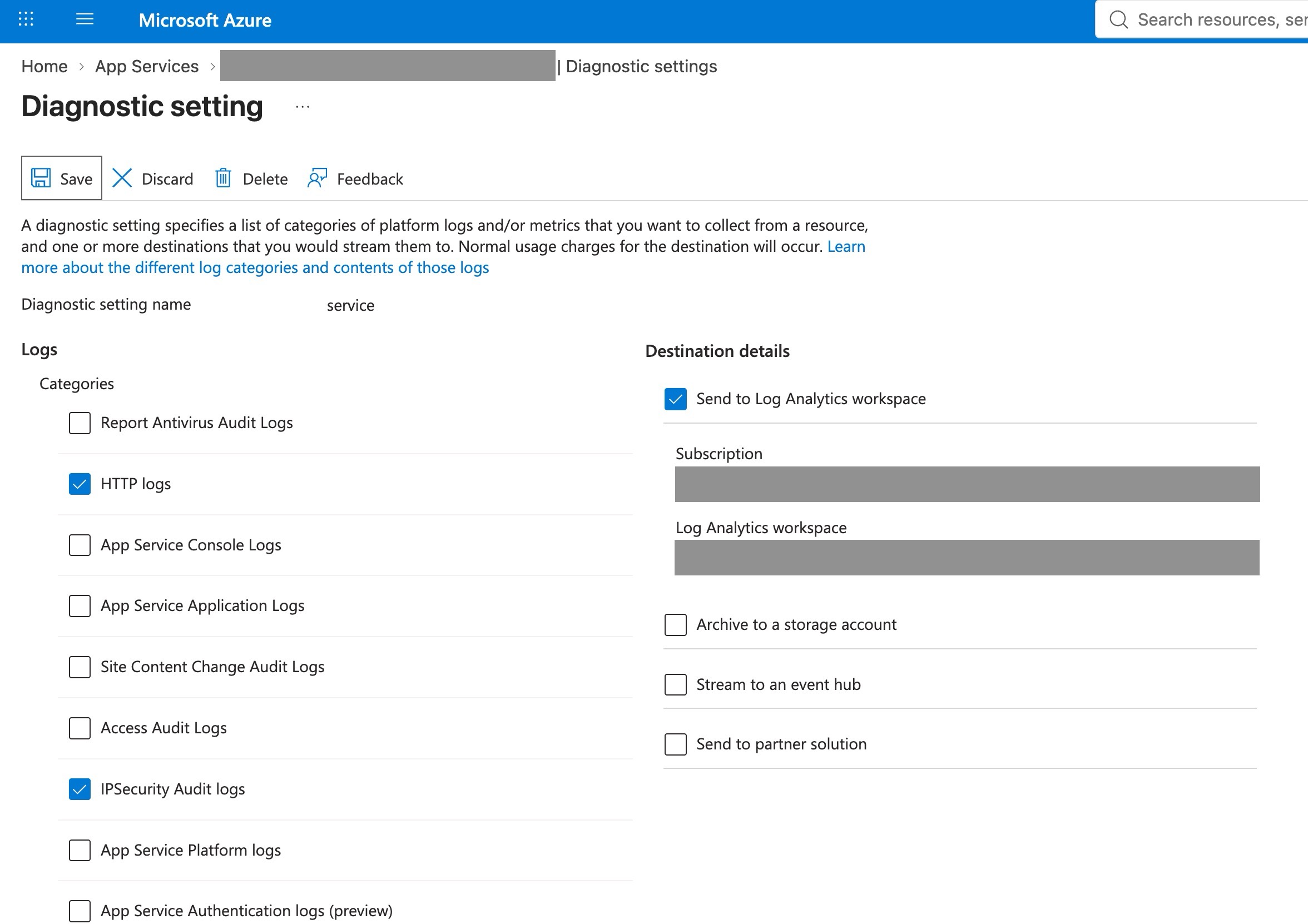
You know the drill: check with your legal counsel on collecting and storing that info, and make sure your privacy/usage policies are up to date.
IPs
Speaking of IPs, assume that hackers will use rotating proxy services going forward. Think about how you need to respond to threats that you can't single out by individual IPs. In this most recent attack, the attacker came at us with IPs from AWS, GCP, Cloudflare, Hetzner and three residential ISPs on three continents. IP blocking doesn't work if the hacker is persistent.
If you're using IP restriction on App Services, allowing the AzureCloud and AzureDevOps tags is a bad idea. Hackers can rent Azure VMs in a few minutes. Of course: AzureCloud is every Azure address there is! AzureDevOps is the hosted-agent fleet, which is anyone with a free Azure DevOps org.
If, in your IP allow lists, you make use of CIDR suffixes, look for any that have suffixes less than /20, which can open your infra up to large portions of the internet. You'd be surpised how easy it is to add an allow rule for x.x.x.x/3 instead of x.x.x.x/30, and hackers know that.
What's In Your Web Database?
Whatever is in master is in web, give or take some unpublished drafts. But that includes other spicy things like:
/sitecore/system/Modules/PowerShell/Script Library/sitecore/system/Settings/Services/API Keys
What if a hacker walked the entire database end to end with an API key from a public JavaScript bundle? No exploit, no auth bypass, no CVE. Just GraphQL working normally.
Got anything in your web DB that shouldn't be? It's not enough just to hope that no one will ever publish the full site or that everyone will remember to set sensitive items to "Never publish"; you need to ensure that the users that your API keys impersonate have the minimum access necessary to do their job.
Do these now:
- If any of the items under
/sitecore/system/Settings/Services/API Keyshave an emptyImpersonation Userfield, set that up ASAP. - If any of the items under
/sitecore/system/Settings/Services/API Keyshave an emptyAllowed Controllersfield, set that up ASAP.
Otherwise, a drive-by is this easy:
1. Query the Endpoint
Nothing in GraphQL restricts the path you ask for; the schema serves whatever the API key's impersonation user can read in the web DB:
curl -s -X POST "https://www.acme.com/api/some-endpoint" \ -H "Content-Type: application/json" \ -H "sc_apikey: {xxxx-xxxx-xxxx-xxxx-xxxx}" \ --data '{"query":"{ item(path: \"/sitecore/system\", language: \"en\") { name children { name hasChildren } } }"}'2. Find the Items by Name
This curl lists every script in the PS library without knowing anything in advance:
curl -s -X POST "https://www.acme.com/api/search" \ -H "Content-Type: application/json" \ -H "sc_apikey: {xxxx-xxxx-xxxx-xxxx-xxxx}" \ --data '{"query":"{ item(path: \"/sitecore/system/Modules/PowerShell/Script Library\", language: \"en\") { name children { name children { name children { name children { name } } } } } }"}'3. Read a script's body
Add a field read on any item the prior query returned:
curl -s -X POST "https://www.acme.com/api/search" \ -H "Content-Type: application/json" \ -H "sc_apikey: {xxxx-xxxx-xxxx-xxxx-xxxx}" \ --data '{"query":"{ item(path: \"/sitecore/system/Modules/PowerShell/Script Library/MySecretScript\", language: \"en\") { name field(name: \"Script\") { value } } }"}'It's that easy.
Pay Careful Attention to These Endpoints
What I saw an attacker actually probe on CD recently:
/sitecore/api/ssc/auth/loginServiceMetadata(OData discovery)ItemServiceItems/Getwith guessed keys/-/item/(Item Web API)/-/xaml//api/sitecore/{assembly-qualified-controller}/Preview/sitecore/shell/*.asmx- GraphQL mutations and introspection
A headless CD only really needs:
/sitecore/api/graph//sitecore/api/layout//sitecore/api/jss//-/media//healthz/- Your own
/api/*routes
Secure Your Nonprod Environments
The simple reality is this: nonprod enviroments don't get as much attention as prod. Now is the time to treat them like prod. Until now I haven't seen bots go after all of the environments. Assume that they will now, thanks to AI spotting patterns and making educated guesses.
Keep it on lock,
-MG